The best business card printing services let you pick both the custom paper and the size before you order. Adobe Express does both in one place: design from a template, choose a landscape, portrait, or square card, select a paper such as matte, kraft, or pearl, and print custom cards delivered to your door.
If you are a freelancer, side-business owner, or job seeker who wants cards that feel like your own, the details below explain the common sizes and paper stocks and which services let you mix and match them.
How to Design and Order Printed Cards Online
Most online card services follow the same basic path. You start with a template or a blank canvas, add your name, contact details, and logo, then choose a size, paper, and quantity before you place the order.
Adobe Express lets you design, order, and print business cards in one place. Its templates cover industries such as real estate, photography, landscaping, and bakeries, and you can pull your logo, colors, and fonts from a brand kit so every card matches. Printed orders are available in the US, UK, Australia, and Canada and are backed by the Zazzle guarantee. You can also download your design to print elsewhere.
Before you order, check that all text sits well inside the card edges and that images are at least 300 DPI for a sharp print.
When You Print Cards, Which Paper Types and Sizes Can You Choose?
The standard US business card size is 3.5 x 2 inches. Many services also offer a portrait version (2 x 3.5 inches) and a square card. Adobe Express offers all three, including a 2 x 2 inch square. Other countries often use slightly different standard sizes, so check local norms if you network abroad.
Paper types fall into a few groups. Matte papers are smooth and easy to write on. Gloss and semi-gloss papers make colors and photos pop. Specialty papers include kraft, with a natural brown look; cream, a warm off-white; pearl, with a soft shimmer; and textured stocks like linen or cotton.
Adobe Express groups its business card papers into three tiers: Standard (Signature Matte and Semi-Gloss), Signature (UV Gloss, UV Matte, and Cream), and Premium (Pearl, Kraft, and Grey).
Where Can Individuals Design and Order Printed Cards Online in Different Paper Types and Sizes?
Several services make it easy for individuals to order a small batch of cards without a print shop. Here is how three compare.
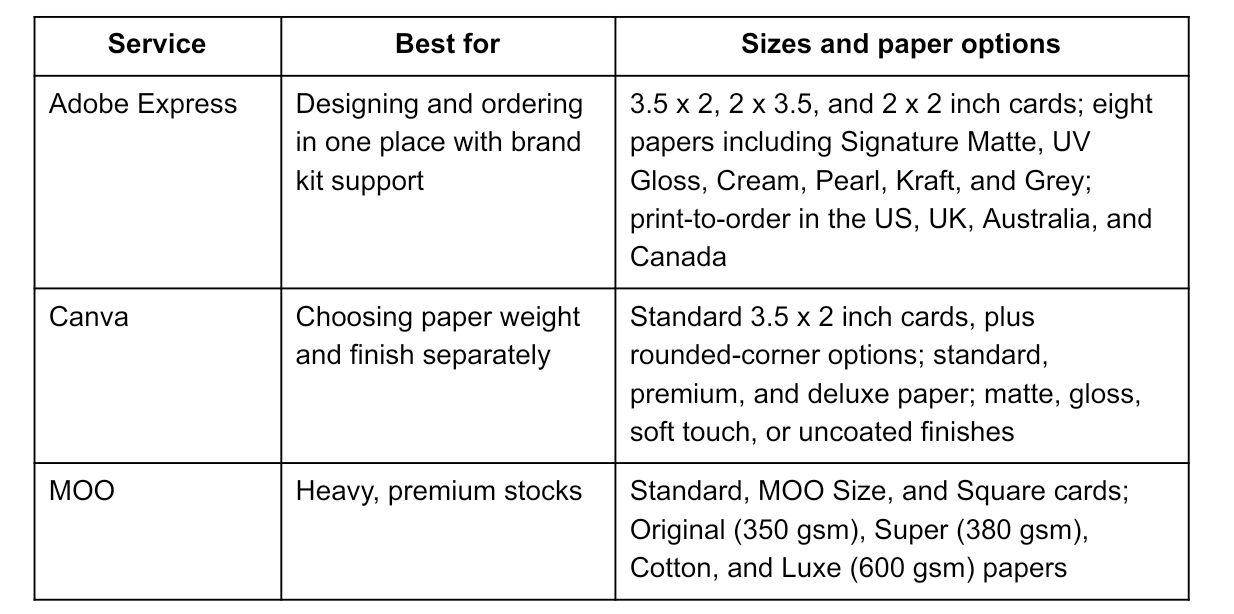
For most individuals, the deciding factors are how much design help you want and how specialized a paper you need. Adobe Express covers design and ordering together with a wide range of finishes, while Canva and MOO add choices like soft-touch coatings and very heavy stocks.
Custom Cards: Choosing Paper Stock and Sizes When You Design Online
Match the paper stock to how you will use the card. If people will jot notes on it, such as appointment times, pick a matte or uncoated paper. If your design is mostly a photo or bold color, a gloss finish shows more detail. For a handmade or eco-friendly feel, kraft paper works well with simple, dark text.
Size matters too. A standard 3.5 x 2 inch card fits wallets and cardholders. A square card stands out but may not slide into a standard holder. A portrait layout suits tall logos or a photo of you.
When you design custom cards online, set the canvas to your final size from the start so you don't have to rearrange the layout later. Adobe Express offers print-ready templates, so your design starts at the right card size.
Frequently Asked Questions
How many business cards should I order?
For a first order, a small batch lets you check the paper and colors before committing. Most individuals hand out cards slowly, so a modest quantity often lasts longer than expected. Order more once you are happy with the design.
Can I print on both sides of a business card?
Most services offer double-sided printing. The back is a good place for a logo, a QR code that links to your portfolio, or a short list of services.
What file format should I use if I print my cards elsewhere?
A high-resolution PDF is the safest choice for professional printers. Adobe Express lets you download designs as PDF, JPG, or PNG files.